FirefoxをバージョンアップしたらSSLでつながらなくなったサイトが出てきた。URLにアクセスすると表示されるのが下記のエラーメッセージである。
Error code: ssl_error_no_cypher_overlap
サイトは過去1年間ほど定期的に接続していたこと、およびFirefoxのバージョンアップ後から突然使えなくなった。Firefoxのバージョンアップによる設定変更が影響していると考えられる。サーバー側の設定に変更があったかどうか確認するためにIEで接続したら特に問題はない。
エラーから考えるにSSLで使うプロトコルがクライアントとサーバー側で一致していないようだ。
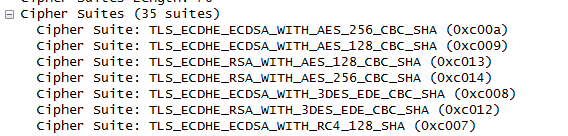
暗号化プロトコルが一致していないと考え、WiresharkでClient HeloとServer Heloを確認してみる。
Client Helo
Server Helo

確認してみると暗号化プロトコルはTLS_RSA_WITH_RC4_128_MD5が両方で使えるらしい。
設定を確認してみてもブラウザで有効になっている。

混乱してしまい、Googleで調べてみる。下記サイトからは現在のSSL設定を確認できる。
Badと表示されたが特に影響はなさそうな項目でエラーが出ている。ここで気が付いたのだがTLS1.2を使っている。このプロトコルは比較的新しい。
about:configの該当部分は下記のようになっている。
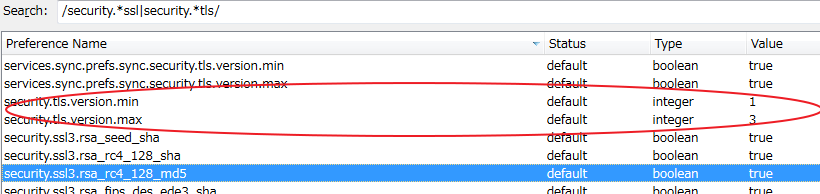
この設定について確認すると以下のように説明されている。
http://kb.mozillazine.org/Security.tls.version.*
security.tls.version.min specifies the minimum required protocol version
  (thus, the lowest version allowed to fall back to when higher versions are not available).
security.tls.version.max specifies the maximum supported protocol version
  (thus, the highest version to initiate a connection with before falling back to lower versions).
If security.tls.version.min and security.tls.version.max are equal,
  only one protocol version will be supported.
  The behavior is undefined if security.tls.version.min is larger than the security.tls.version.max value.
0:SSL 3.0 is the minimum required / maximum supported encryption protocol.
(This is the current default for the minimum required version.)
1:TLS 1.0 is the minimum required / maximum supported encryption protocol.
(This is the current default for the maximum supported version.)
2:TLS 1.1 is the minimum required / maximum supported encryption protocol.
3:TLS 1.2 is the minimum required / maximum supported encryption protocol.
(Not supported in Firefox 23.0 and SeaMonkey 2.20.)
さらにServer Heloを見てみると、SSL3でハンドシェークをしようとしている。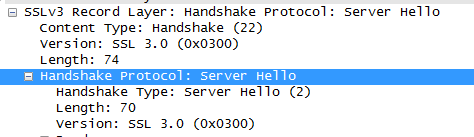
そこでsecurity.tls.version.minを0に変更した。

この結果無事にサイトに接続できるようになった。