科学の箱

科学・IT・登山の話題

Python

seleniumでWebElement object is not iterableが出るときの対処方法

投稿日:

iterableなオブジェクトを想定して要素を取得、forループに取り込むと下記のようなWebElement object is not iterableが出る。
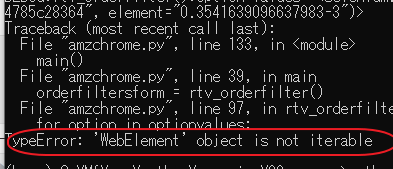
結論としては勘違い。

Seleniumのドキュメントを見てみる。

https://kurozumi.github.io/selenium-python/locating-elements.html

単数のオブジェクトを取得する場合には下記のメソッドを利用する。

  • find_element_by_id
  • find_element_by_name
  • find_element_by_xpath
  • find_element_by_link_text
  • find_element_by_partial_link_text
  • find_element_by_tag_name
  • find_element_by_class_name
  • find_element_by_css_selector

複数の場合にはこちら。”s”一文字でずいぶん結果が変わってくる。。。

  • find_elements_by_name
  • find_elements_by_xpath
  • find_elements_by_link_text
  • find_elements_by_partial_link_text
  • find_elements_by_tag_name
  • find_elements_by_class_name
  • find_elements_by_css_selector


メタ情報

inarticle


メタ情報

inarticle


-Python
-

執筆者:


comment

メールアドレスが公開されることはありません。 * が付いている欄は必須項目です

関連記事

no image

selectorとxpathを手軽に取得する方法

スクレイピングをするプログラムを開発するときに対象となる項目を取得するためにselector/xpathで指定する。 Google Chromeではselector/xpath値を簡単に取得できる。 …

no image

numpyで配列を抜き出す方法

numpyで配列を抜き出す まず基本となるやり方 arr = np.arange(50).reshape(5,10) arr[1:1,] arr[1:2,]   np.arange(50)で …

no image

SIGNATE お弁当の需要予測-5

相関の概要を見てみる。これによりどの変数を利用して回帰するかを考える。 sns.heatmap(d_train_w.corr(),cmap=’coolwarm’) Related posts:Pyth …

no image

pythonでTensorFlowを使うまで

TensorFlowが利用できるまでの設定手順をまとめる。 まず基本となるインストラクションはこちらにある。 https://www.tensorflow.org/install/pip このインスト …

no image

単回帰でデータフレームの形式を整える

values.reshape(-1, 1)が必要。 Related posts:automated the boring配列同士の四則演算flip, fliplr, flipudを使って配列要素を上下 …

2018年11月
« 10月   12月 »
 1234
567891011
12131415161718
19202122232425
2627282930  

side bar top


アーカイブ

カテゴリー