科学の箱

科学・IT・登山の話題

Python

Python + Slack Bot – 2

投稿日:

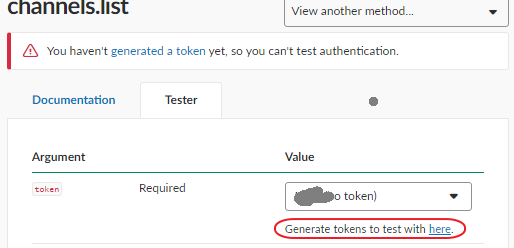
Slackのチャネルに投稿するにはChanel IDが必要。

Chanel IDは下記から取得できる。

https://api.slack.com/methods/channels.list/test

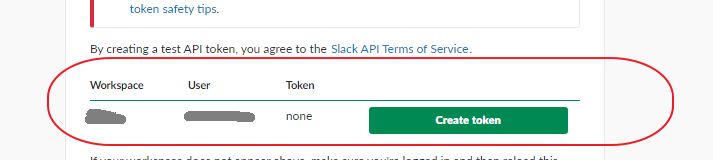
しかしテストをするためにはLegacy Tokenが必要。

これは下記から生成できる。


サンプルコードはここから

https://python-slackclient.readthedocs.io/en/1.0.2/

とりあえずチャネルにメッセージを送るコード


from slackclient import SlackClient

token = "xoxp-xxxxxxxxxxxxxxxxxxxxxxxxxxxxxxxxxxxxxxx" # found at https://api.slack.com/web#authentication
sc = SlackClient(token)
sc.api_call("api.test")
sc.api_call("channels.info", channel="CHANEL ID HERE")
sc.api_call(
   "chat.postMessage", channel="#starterbot-test", text="Hello from Python! :tada:",
   username='pybot', icon_emoji=':robot_face:'
)


次にリアルタイムでメッセージを送るコード


import time
from slackclient import SlackClient

token = "xoxp-xxxxxxxxxxxxxxxxxxxxxxxxxxxxxxxxxxxxxxxxxxx"# found at https://api.slack.com/web#authentication
sc = SlackClient(token)
if sc.rtm_connect():
  while True:
    print(sc.rtm_read())
    time.sleep(1)
else:
  print("Connection Failed, invalid token?")


メタ情報

inarticle


メタ情報

inarticle


-Python
-

執筆者:


comment

メールアドレスが公開されることはありません。 * が付いている欄は必須項目です

関連記事

no image

pandaでdataframeを利用するときの基本操作

Dataframeを作成します。 import numpy as np import pandas as pd from numpy.random import randn np.random.see …

no image

kaggle Titanic Tutorial – 11

kaggleで人気があるlightGBMをつかってみる。   インストール pip install lightgbm 特に問題がなく終了。 コード、関係するところだけ記載。 split_be …

no image

グラフの軸を操作する

概要 ここでは以下の項目について取り扱う 軸にラベルを設定する ー xlabel, ylabel 軸の最小値、最大値を設定する ー xlim, ylim, xaxis 軸にメモリを設定する ー xti …

no image

Anaconda Jupyterで自動補完を使う手順

まずはnbexensionsをインストール。これは拡張モジュールを管理する機能。 conda install -y -c conda-forge jupyter_contrib_nbextension …

no image

flickrapiを使うための手順

https://stuvel.eu/flickrapiで提供されるflickrapiを利用するにあたり、エラーが出てインストールできない。 condaでは提供されていない pipはSSLError(S …

2018年9月
« 6月   10月 »
 12
3456789
10111213141516
17181920212223
24252627282930

side bar top


アーカイブ

カテゴリー